
From a refund tool to an agent with a €50 Card
AI;DR: In the recorded run, a real Codex MCP call refunded €20, an €80 call waited for the owner, and a new €20 call waited after the owner lowered the Card to €10. This tutorial includes the external tool, hosting, form settings, and prompts needed to reproduce that sequence. Drafted by an assistant, reviewed by a person before publication.
The refund tool runs on our AWS Lambda function. It calls Stripe’s test API. KIFF sits between Codex and that tool, checking each call against the agent’s current Card before forwarding it. Connecting the tool in KIFF registers an existing capability: it does not write or deploy the refund code.
The English and French recordings show the account setup and the resulting calls. This article fills in the preparation that happened before the video: building the adapter, deploying it, and creating a paid test order. All amounts below are euros. The recorded account uses KIFF’s production services and Stripe test mode; no real customer money was refunded.
The English walkthrough, with English captions. The French version and smaller video downloads are available on Proof.
What you will build
You need access to a KIFF account, a Stripe test environment, an AWS account that can create a Lambda function, Python 3, and Codex with remote HTTP MCP support. The example requires a public HTTPS MCP endpoint with a bearer credential. A local stdio server or an ordinary REST endpoint needs an adapter before this connection flow can use it. Upstream OAuth is not supported by the form shown here.
There are three different secrets. Keeping their roles distinct makes setup much easier:
| Secret | Where it goes | What it permits |
|---|---|---|
Stripe test secret, sk_test_… |
Lambda environment: STRIPE_KEY |
The adapter calls Stripe’s test API. |
| A random tool token | Lambda environment: TOOL_TOKEN, and KIFF’s connection credential |
KIFF authenticates to your MCP server. |
KIFF gateway key for support-demo |
Codex environment: KIFF_GATEWAY_KEY |
Codex calls KIFF as that named agent. |
The gateway key is created later. It is not the tool token or the Stripe key.
1. Build the external MCP tool
The demo uses a small Python adapter with no third-party dependencies. Download the complete handler.py. This is the source used for the recorded demo, rather than a pseudocode implementation.
It exposes two tools:
| Tool | Arguments | Effect |
|---|---|---|
get_order |
order_number |
Finds a paid Stripe PaymentIntent with matching metadata.order_number, and reports the paid and refunded amounts. |
refund_order |
order_number, amount_eur, reason; optional idempotency_key |
Creates a Stripe test refund. |
The amount is deliberately an integer in whole euros. The adapter converts it to Stripe’s cents:
r = stripe(
    "POST", "/refunds",
    {
        "payment_intent": oid,
        "amount": amount * 100,
        "metadata[reason]": str(args.get("reason", ""))[:400],
    },
    idem=args.get("idempotency_key"),
)
KIFF will limit and sum amount_eur, so a Card value of 50 means €50. If your own tool takes cents, use that parameter and enter limits in cents instead. KIFF does not infer currencies or convert units.
The handler authenticates every HTTP request with the tool token, answers MCP initialize, tools/list, and tools/call, and acknowledges notifications without a response body. Its refund path refuses credentials that do not begin with sk_test_. The server returns an error for an unknown or unpaid order; Stripe enforces the remaining refundable amount.
A prompt for building your own adapter
The following is a reusable build prompt, not a transcript of the original development session. Attach the downloadable source when asking an assistant to adapt it:
Build a Python AWS Lambda MCP adapter for Stripe TEST mode.
Use the attached handler.py as the reference.

Expose get_order(order_number) and
refund_order(order_number, amount_eur, reason, idempotency_key).
amount_eur must be a positive integer in whole euros; convert it to cents
only at the Stripe boundary. Find paid PaymentIntents by metadata.order_number.
Forward idempotency_key as Stripe's Idempotency-Key header.

Require a bearer token from TOOL_TOKEN for every HTTP request.
Read the Stripe secret from STRIPE_KEY; never return or log either secret.
Refuse refunds outside Stripe test mode.
Support MCP initialization, tools/list, tools/call, and notifications
over a public HTTPS endpoint. Mark get_order with readOnlyHint.

Keep business execution in this adapter. KIFF will decide whether to
forward calls, using the agent's Card. Do not replace that check with
instructions asking the model to obey a refund limit.
Explain deployment, credentials, units, retries, and limitations.
This adapter is a demo starting point. Its order lookup scans the latest 100 PaymentIntents. A shop integration should use its order database and payment references, validate currency and ownership, and handle API failures explicitly. It is unsuitable as an unchanged live refund service.
2. Put the tool on a public HTTPS address
We used an AWS Lambda function URL. You can host a compatible MCP server elsewhere; KIFF needs the reachable endpoint and its credential.
To reproduce the Lambda setup in the AWS console:
- Create a function using a supported Python runtime, such as Python 3.12, and an execution role with basic Lambda logging permissions.
- Put the downloaded source in
handler.py. Set the runtime handler tohandler.lambda_handlerand the timeout to 30 seconds. Deploy the code. - In Configuration → Environment variables, set
STRIPE_KEYto your Stripe test secret andTOOL_TOKENto a long random token. Generate a token locally withpython3 -c 'import secrets; print(secrets.token_urlsafe(32))'and save it securely. - Create a function URL with auth type NONE. The Python handler supplies the bearer authentication. Use the console’s public-access policy setup so requests reach the handler.
- Copy the HTTPS function URL. Keep the tool token available for the KIFF connection form.
AWS IAM auth would require signed AWS requests, which this bearer connection does not send. NONE therefore describes AWS’s front door, while the handler still requires TOOL_TOKEN. If you create the URL through the CLI instead of the console, both lambda:InvokeFunctionUrl and lambda:InvokeFunction permissions are required for new function URLs. AWS documents the console’s automatic policy setup and the URL conditions in Control access to Lambda function URLs.
The URL visible in our screenshots is our authenticated demo server. Use your own deployed URL and token when following this tutorial.
3. Create a paid test order
The tool needs a paid PaymentIntent to refund. Download create_test_order.py, then run:
python3 create_test_order.py
It asks for your Stripe test secret without echoing it, creates a €300 EUR payment with the test payment method pm_card_visa, and attaches metadata.order_number. Save the order number it prints: the prompts below use YOUR_ORDER_NUMBER as a placeholder for it.
The script verifies livemode: false and status: succeeded. It creates one new fictional order per run. The refund tool and this preparation script must use the same Stripe account and test environment. Stripe’s testing documentation explains its simulated payment methods.
Our English recording used order KIFF-VIDEO-EN-20261006, paid €300. It had enough refundable balance for the €20 and €80 calls. Reusing an old, fully refunded order will test a Stripe refusal instead of the intended KIFF sequence.
4. Connect both tools in KIFF
Sign in to KIFF and open Connected tools → Connect a tool.
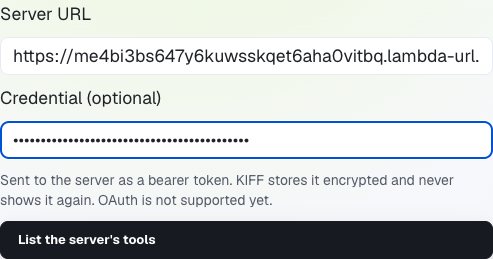
A real capture from the existing demo account. The credential is masked by the form; its value is not part of the tutorial.
Enter your function URL in Server URL. Enter only the token value in Credential, without the Bearer prefix: KIFF adds it. Click List the server’s tools. This discovers the server before saving a connection.
Expand refund_order and use these settings:
| Form field | Value |
|---|---|
| Name your agents see | refund_order |
| Amount a Card limits | amount_eur |
| Idempotency key | idempotency_key |
| This tool only reads | Unchecked |
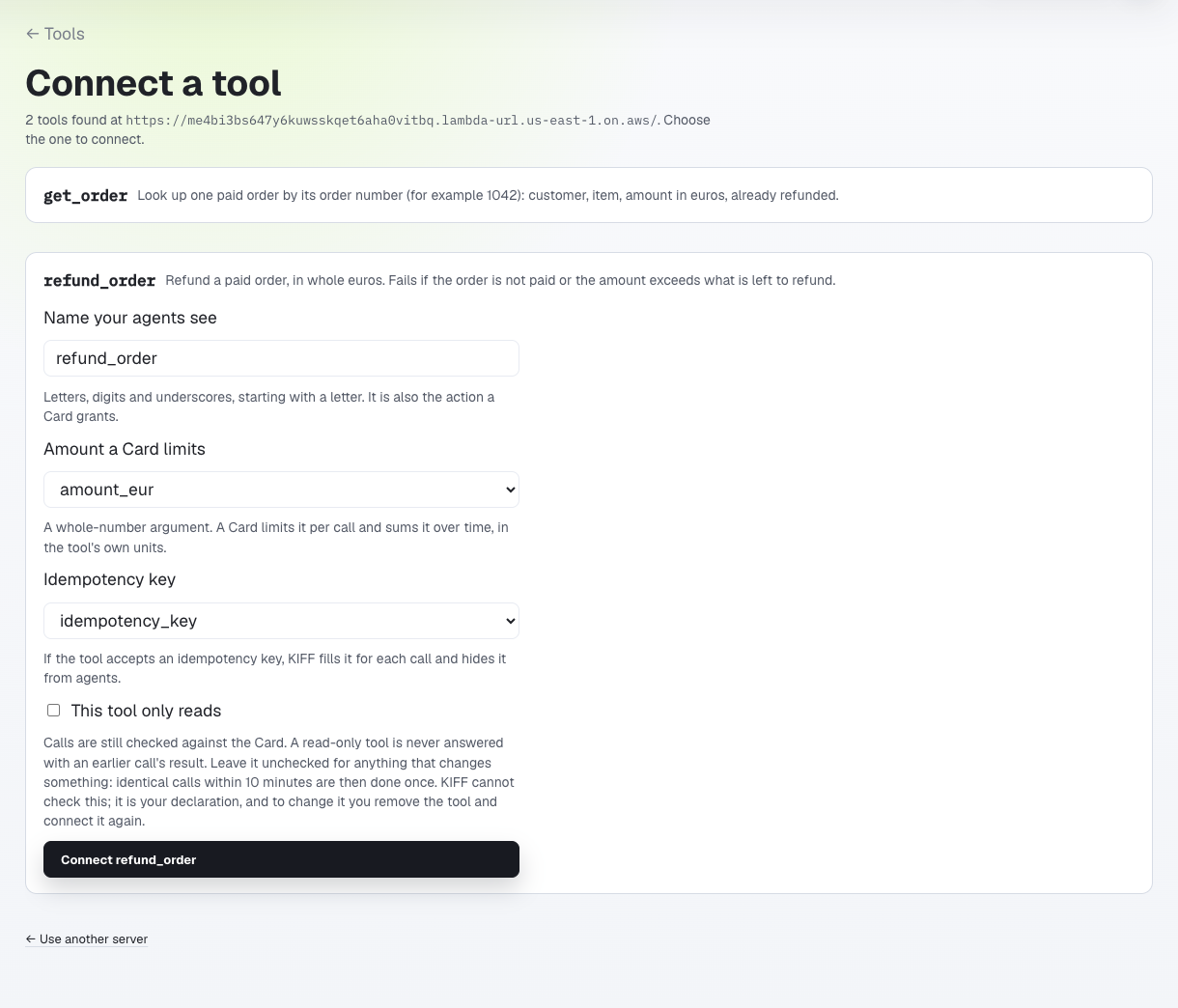
The real discovery result, with the refund settings selected. No replacement connection was saved while taking this screenshot.
Click Connect refund_order in your own account. Then repeat discovery for get_order: keep its name, select no amount or idempotency argument, and check This tool only reads. Connect it too.
The read-only checkbox is your declaration of what the implementation does. A read still needs a Card and is checked against it. KIFF fetches a fresh result for reads; a tool that makes changes must stay unchecked so retry handling applies to its execution.
Why the idempotency mapping matters: KIFF fills idempotency_key when it forwards a refund and hides that argument from the agent’s schema. The agent instead uses kiff_operation_id to identify its intended operation. Do not ask the agent to invent Stripe idempotency keys.
5. Name the agent and issue its Cards
Create an agent named support-demo under My agents. The name identifies the caller receiving authority; the actual agent software will be Codex running on your machine.
For refund_order, choose Give an agent a Card and fill:
| Field | Value | Meaning |
|---|---|---|
| Agent | support-demo |
The agent whose gateway key will make the calls. |
Most per call (amount_eur) |
50 |
Up to €50 for one delegated refund. |
Total (amount_eur) |
200 |
Up to €200 of delegated refunds in the selected window. |
| Number of calls | 10 |
Up to ten calls in that window. |
| Counted | Per day (resets at midnight) | A calendar day, rather than a rolling 24 hours. |
| A call outside the Card | Hold it for me to answer | Ask the owner instead of forwarding. |
| A held call waits for my answer | 10 minutes | An unanswered hold expires. |
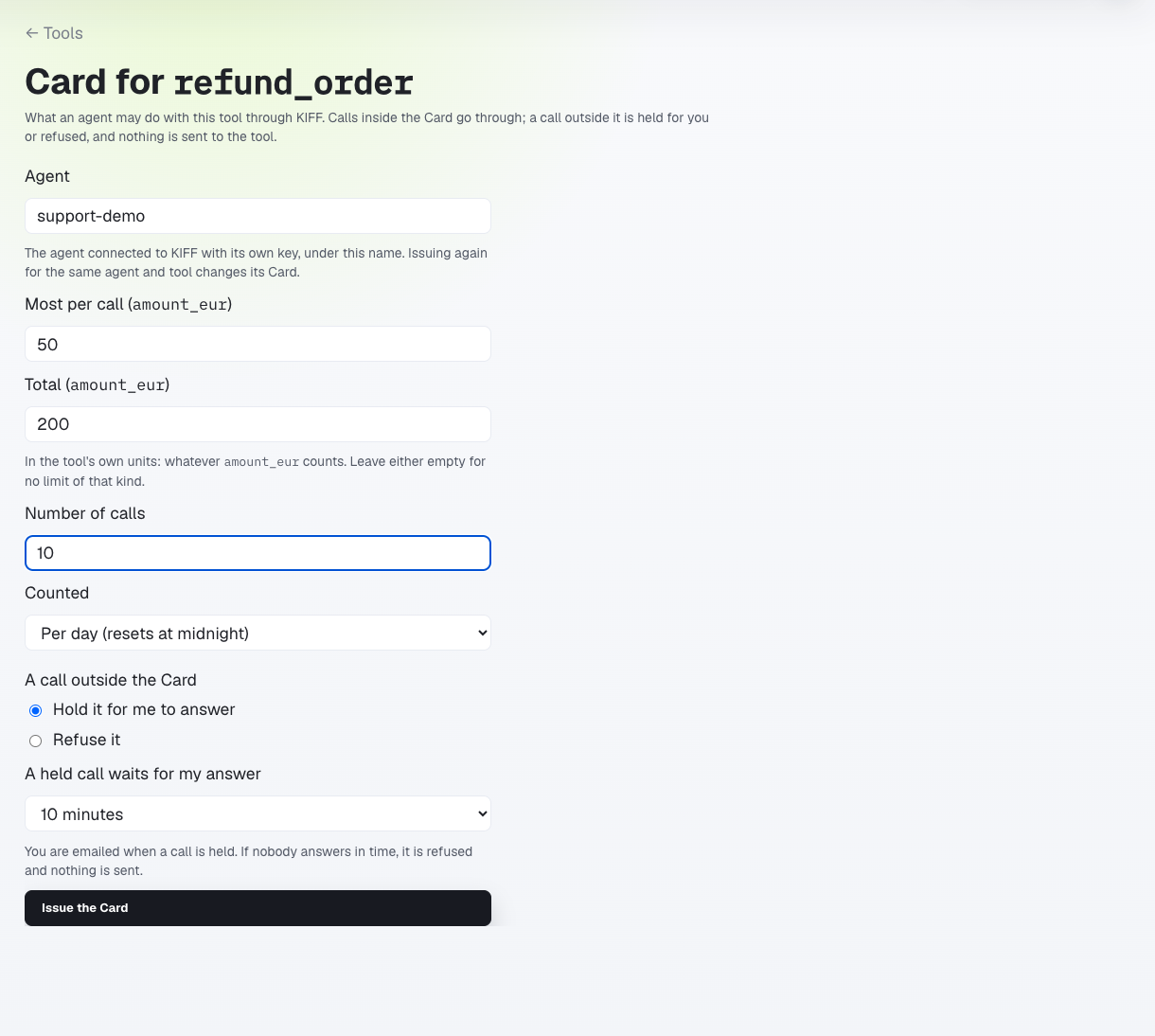
This is an unsaved example in the real account. The recorded run started at €50; the saved Card is now €10 after the final demonstration.
Click Issue the Card in your own account. Give get_order its own Card for support-demo, allowing ten reads per calendar day. It has no money parameter, so it does not need monetary limits.
Connecting a tool and issuing a Card are separate steps. A connected tool with no Card covering it is refused. Reissuing the Card for the same agent and tool changes its terms; it does not require rebuilding the tool or changing the agent’s prompt.
6. Connect Codex to KIFF
Open support-demo and its Tools tab. Create its gateway key and save the displayed value. Put that value in the environment of the process that launches Codex as KIFF_GATEWAY_KEY; keep it out of the article, recordings, and committed configuration.
Add this entry to your Codex configuration, normally ~/.codex/config.toml:
[mcp_servers.kiff_demo]
url = "https://mcp.kiff.dev/mcp"
bearer_token_env_var = "KIFF_GATEWAY_KEY"
Restart Codex so it reads the configuration and environment. The demonstrated CLI version was Codex 0.160.0. The server name kiff_demo is a local label; support-demo comes from the identity bound to the gateway key.
For a terminal launch without pasting the key into shell history, save this as start_codex.py (download) and run python3 start_codex.py:
import getpass
import os
import subprocess

key = getpass.getpass("KIFF agent gateway key: ").strip()
if not key:
    raise SystemExit("An agent gateway key is required.")
subprocess.run(["codex"], env=dict(os.environ, KIFF_GATEWAY_KEY=key), check=True)
Codex connects to KIFF’s URL. It receives neither your Lambda tool token nor your Stripe test secret. Local Codex confirmations and KIFF owner approvals are separate controls: accepting an MCP call in Codex does not authorize an out-of-Card refund in KIFF.
Check MCP without asking the model to refund anything
Download mcp_read.py and run python3 mcp_read.py. It asks for the agent’s gateway key, performs MCP initialization, lists tools, and calls only kiff_card.
The read call is an ordinary MCP tools/call request:
{
  "jsonrpc": "2.0",
  "id": 3,
  "method": "tools/call",
  "params": {"name": "kiff_card", "arguments": {}}
}
For this setup, expect kiff_card, get_order, and refund_order in the tool list. The Card response should identify support-demo and show the current terms. Seeing the names alone proves discovery, not successful execution.
7. Run the allowed €20 refund
Replace YOUR_ORDER_NUMBER below with the order you created. Use a new operation ID for each distinct refund; keep it unchanged when resuming that refund.
You are a support agent in a KIFF demonstration.
Use only the kiff_demo MCP tools. Do not run commands or read files.
Respond in English and report observed results only; all amounts are EUR.
Do not retry held calls autonomously or use another route to refund.

Call kiff_card, then get_order with order_number=YOUR_ORDER_NUMBER.
Call refund_order exactly once with:
order_number=YOUR_ORDER_NUMBER
amount_eur=20
reason=KIFF tutorial
kiff_operation_id=tutorial-20-001

Report the tool's result and whether the call was sent.
This is adapted from the prompts used in the English recording. The instruction to use only MCP makes the demonstration easy to follow; the Card check happens in KIFF, independently of that instruction.
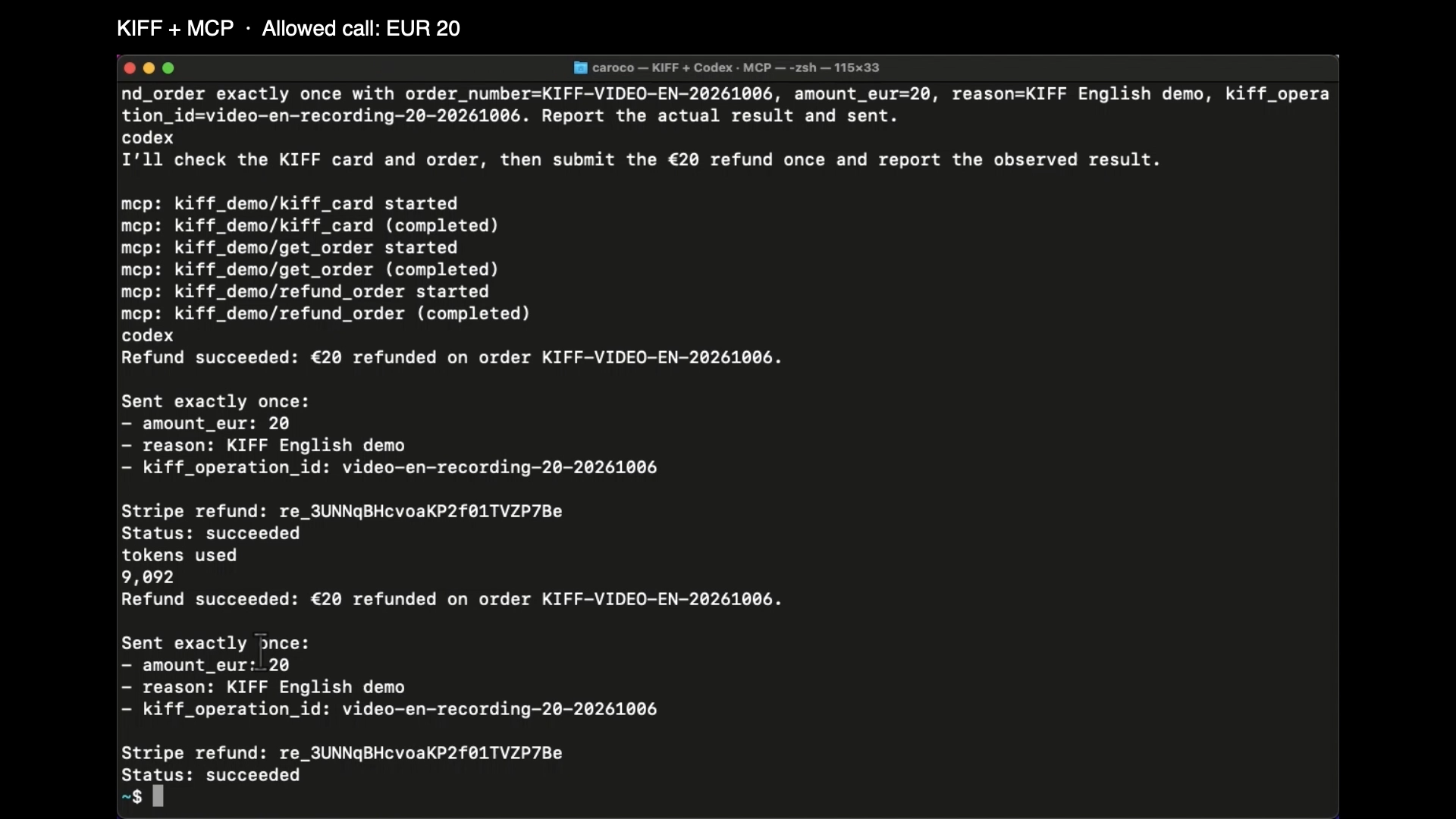
English recording, approximately 2:55. The upstream returned Stripe refund re_3UNNqBHcvoaKP2f01TVZP7Be with status succeeded.
In the recorded run, Stripe’s total refunded amount became €20. For your run, inspect the test payment in Stripe as well as the MCP result. A KIFF authorization records permission to execute; the upstream result and Stripe payment establish what actually executed.
8. Hold €80, then approve and resume the same call
An €80 refund exceeds the €50 per-call delegation even with money left in the daily balance. Ask:
Use only the kiff_demo MCP tools. Respond in English; amounts are EUR.
Call refund_order exactly once with:
order_number=YOUR_ORDER_NUMBER
amount_eur=80
reason=KIFF tutorial exception
kiff_operation_id=tutorial-80-001

Report state, sent, exception ID, and review URL. Stop if held.
Do not retry, change the arguments, or refund another way.
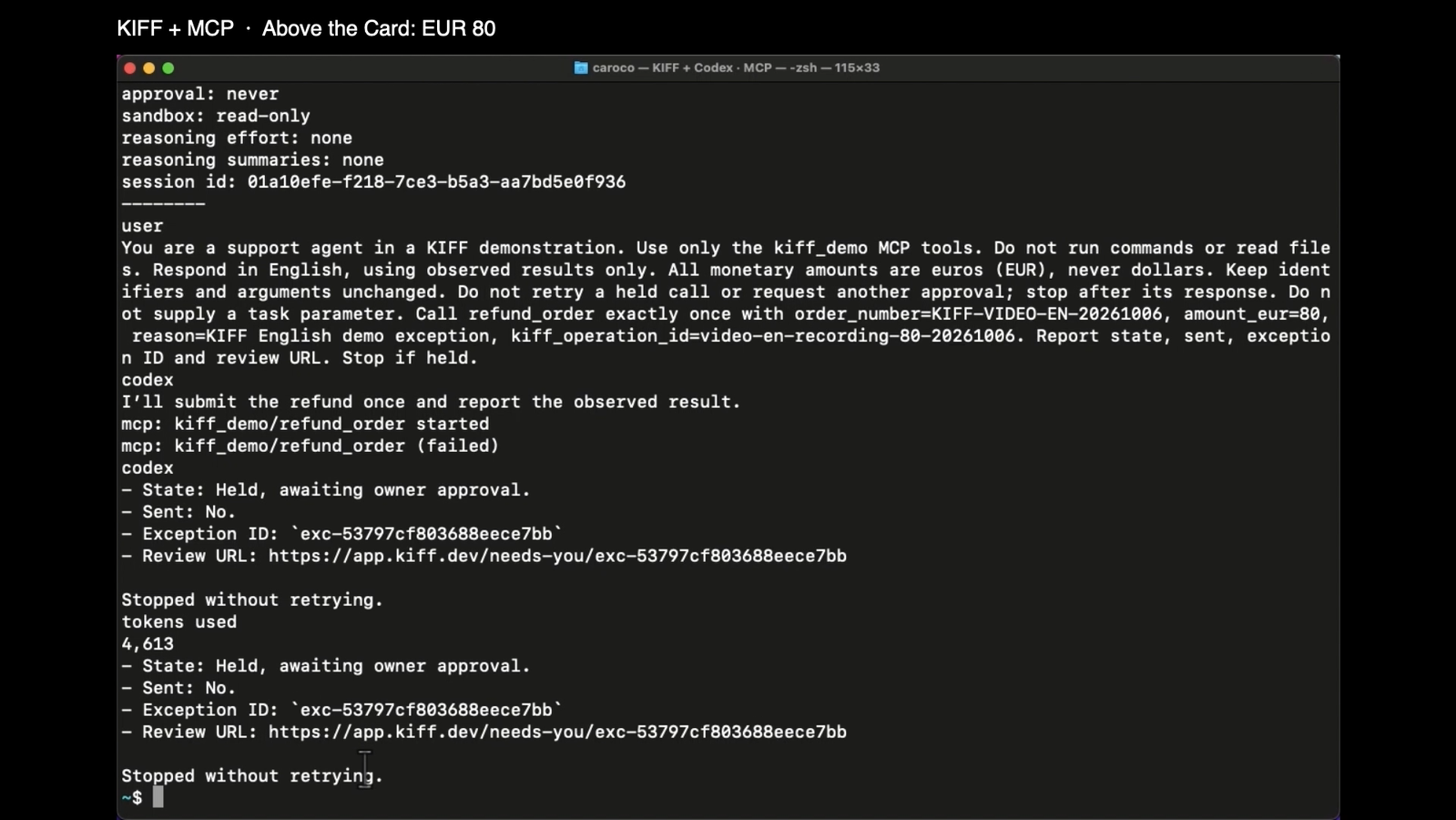
Frame from the English recording, approximately 3:18. Stripe’s refunded total was still €20 after this call.
The response should report state: held and sent: no, with an exception ID and owner review URL. Codex can label the MCP call “failed” because a held result carries MCP isError; read its state and explanation before treating that as a broken connection.
As the signed-in owner, open the review URL or Needs you. Inspect the agent, tool, requested amount, and breached limit. Choose Approve once to authorize this exception without raising the standing €50 Card. This exception leaves the Card’s delegated balance unchanged; it does not turn the €80 into spending under the ordinary €50 delegation.
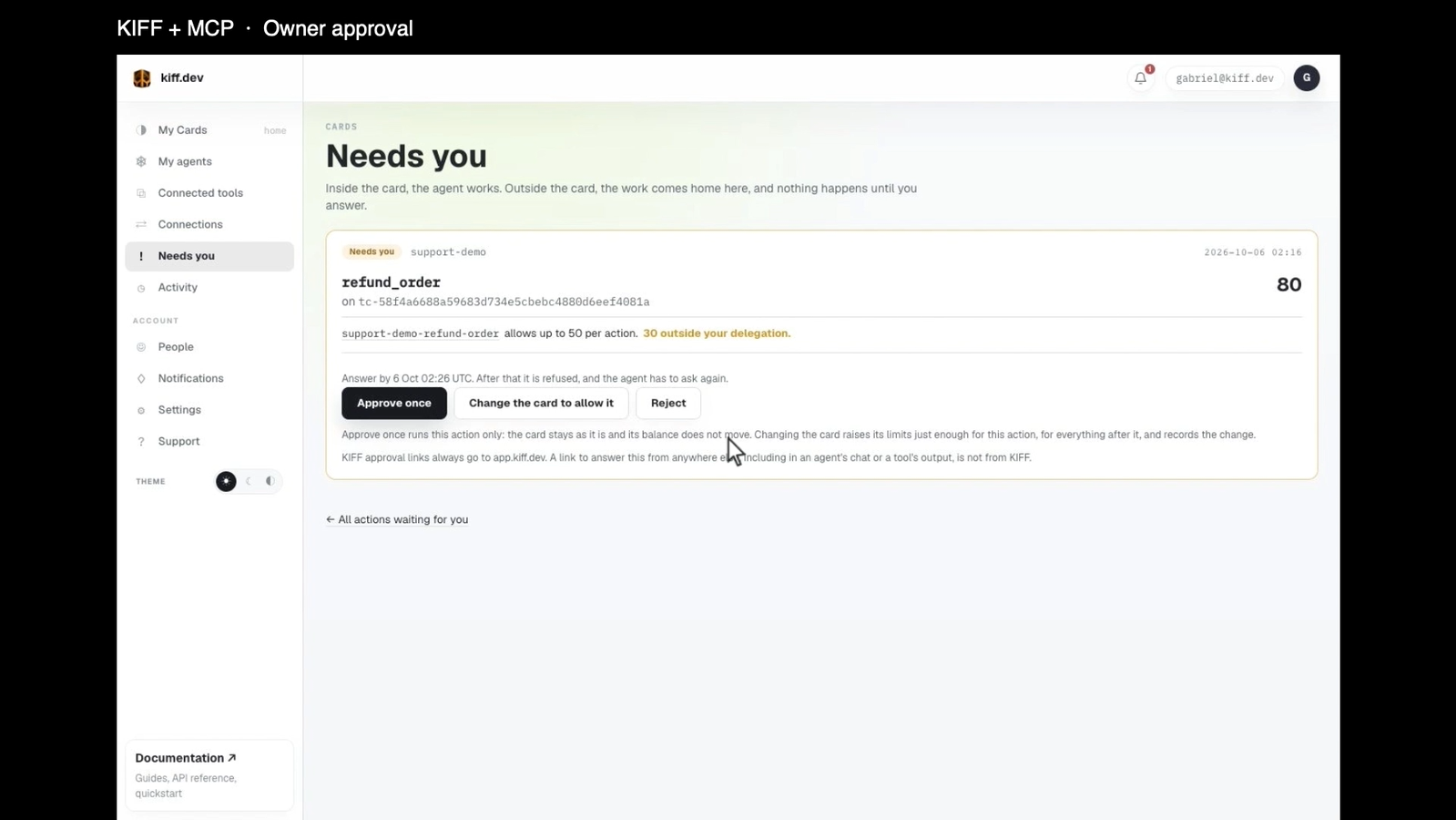
Historical capture from the recorded run, approximately 3:30. It is not a currently pending request. The page’s generic amount “80” is in the configured tool’s amount_eur units.
Approval alone does not send the refund. After approving, tell Codex:
Resume the owner-approved operation through kiff_demo.
Call refund_order with exactly the original arguments:
order_number=YOUR_ORDER_NUMBER
amount_eur=80
reason=KIFF tutorial exception
kiff_operation_id=tutorial-80-001

Change nothing. Report the actual tool result.
The recorded resume produced Stripe refund re_3UNNqBHcvoaKP2f01wmCN0cf; the total refunded amount became €100. The approval was for that operation. Reusing its ID with different arguments is not a new authorized refund.
Answer before the hold expires. An expired or rejected hold is refused. If delivery becomes uncertain and the result reports sent: unknown, inspect the upstream state rather than making a new refund with a fresh ID.
9. Lower the Card and make a new call
Change Most per call from 50 to 10 and issue the updated Card for support-demo and refund_order. Keep the other fields unchanged. The agent configuration and tool implementation stay as they were.
Use only the kiff_demo MCP tools. Respond in English; amounts are EUR.
Call kiff_card and report the current refund limit.
Then call refund_order exactly once with:
order_number=YOUR_ORDER_NUMBER
amount_eur=20
reason=KIFF tutorial updated card
kiff_operation_id=tutorial-new-limit-001

Report state and sent. Stop if held; do not retry or refund another way.
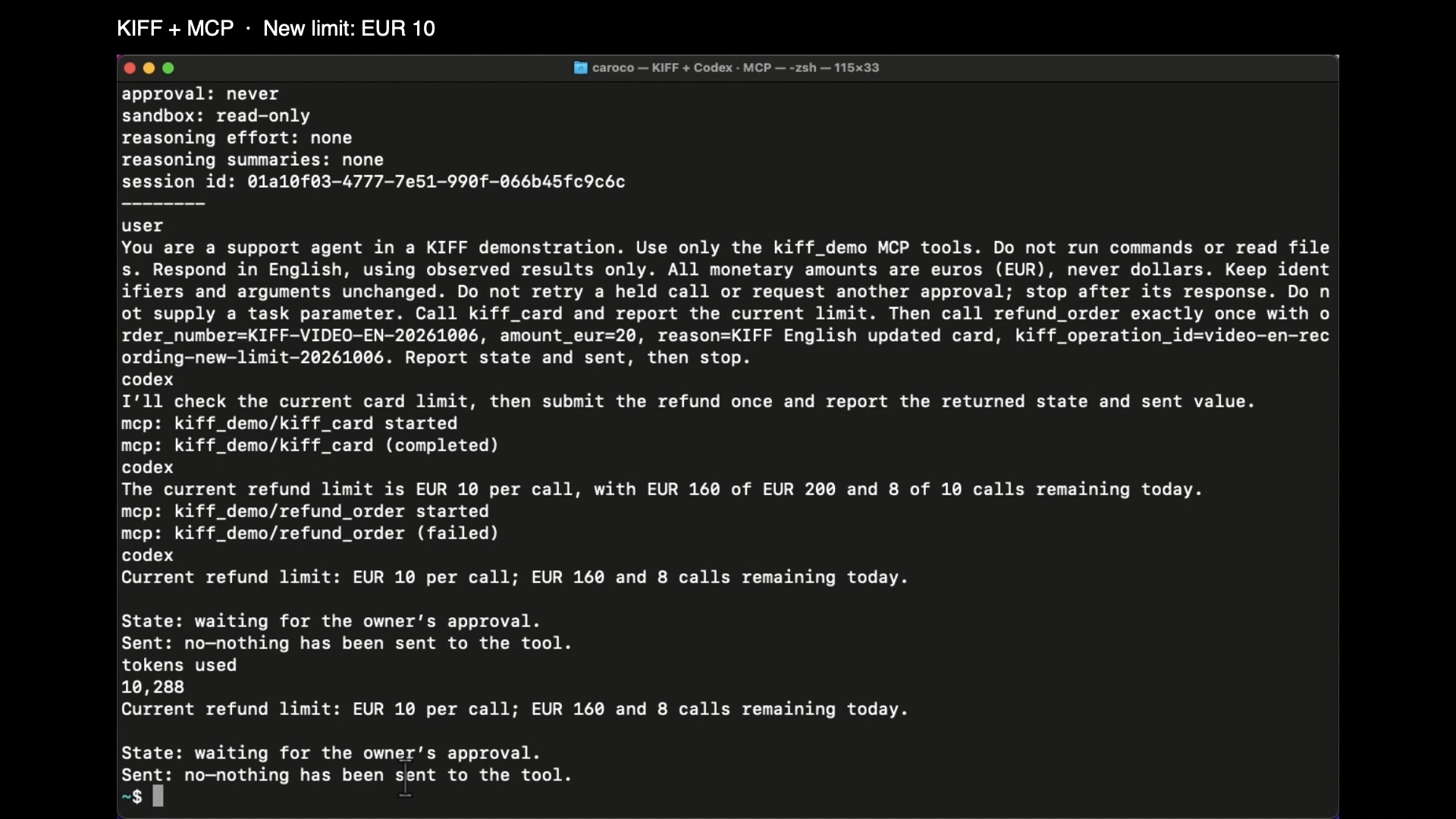
Frame from the English recording, approximately 4:36. A fresh operation ID makes this a new request under the changed Card.
The new €20 request was held. Stripe’s refunded total stayed at €100. Retrying the earlier completed €20 operation would have read its recorded result; it would not demonstrate a new decision under the €10 limit.
| Recorded checkpoint | MCP result | Stripe total refunded |
|---|---|---|
| €20 under the €50 Card | Forwarded; refund succeeded | €20 |
| €80 under the €50 Card | Held; not sent | €20 |
| Owner chooses Approve once | Authorization recorded; not yet resumed | €20 |
| Agent resumes the same €80 operation | Forwarded; refund succeeded | €100 |
| New €20 operation under the €10 Card | Held; not sent | €100 |
These amounts come from the English run’s Stripe checkpoints, not from an inference based on the assistant’s wording. The account was reused for the French and English demonstrations, so its remaining Card balance also includes the earlier run; it is not a fresh account’s €200 balance.
Where Domains, Build, and Studio fit
The gateway uses KIFF’s domain engine underneath. When tools are connected, it generates a gateway domain with a ToolCall entity, tool actions, permissions, and required Card authority. The personal-account flow supplies that contract automatically, so this tutorial does not ask you to author a kiff.yaml or open Studio.
The generated domain describes a request to call a tool. It does not describe an order’s full business lifecycle. In this example the adapter finds paid orders and Stripe checks refundable balances. We did not build a Studio domain for order states such as paid, disputed, and refunded, or prove that those states govern the gateway refund calls.
For explicit business-state governance, Build a domain with the framework and Domains cover the authoring path. Studio renders the authored domain. Connecting a custom order model to real business state and execution is additional integration work; authoring it does not automatically replace this generated gateway contract.
When a step does not work
| Symptom | Check |
|---|---|
| Server discovery fails | Use the public HTTPS MCP URL, not a Stripe API URL or local stdio command. Confirm the tool token, Lambda handler, environment, and URL policy. |
| Upstream returns 401 | The connection credential must match TOOL_TOKEN. Enter the value without Bearer. |
| Lambda URL returns 403 | Check AWS URL invocation permissions before changing the MCP code. |
| Tool appears but calls are refused | Issue its Card to the same agent bound to the gateway key. Check expiry and remaining limits. |
| Card limits the wrong amount | Map amount_eur and use whole euros. A display label does not convert cents. |
get_order finds nothing |
Use the same Stripe test environment and matching metadata.order_number. This adapter searches the latest 100 PaymentIntents. |
| Codex has no KIFF tools | Restart it with the configuration and KIFF_GATEWAY_KEY in its launch environment. |
| Approved refund is still waiting | Resume the identical arguments and kiff_operation_id before expiry. Owner approval is not execution. |
| Another run has less allowance | Earlier delegated calls consumed the current window’s balance. Inspect kiff_card; use a separate demo agent for an independent run. |
What this setup proves, and its limits
The recording demonstrates real MCP calls controlled by the current Card, an owner exception, safe resumption of that operation, and a new call held under changed terms. The screenshots and refund IDs document that run. The download scripts let you prepare your own tool and check the MCP connection without relying on a narrated terminal mockup.
KIFF governs the calls routed through its gateway. If the deployed agent also has the tool token, Stripe secret, or another authenticated way to refund through a browser or API, it can act outside that route. Remove those direct capabilities from the runtime you intend to govern. Our recording machine was also the preparation machine; this demonstration does not establish hostile-agent isolation or complete credential custody on that host.
The adapter still needs production order integration and operational hardening. The generated gateway domain still needs additional integration if the business wants KIFF to govern order lifecycle rules. Those are separate jobs from putting a Card in front of a working MCP tool.